Plugin Overview
Take full control of async operations from Blueprints — no C++ required.
Async Blueprint Tools is a lightweight, production-ready Unreal Engine plugin that lets you run Blueprint logic on background threads, safely return to the game thread, introduce non-blocking delays, and even create cancelable asynchronous loops — all through pure Blueprint nodes.
Ideal for games and tools that demand concurrency without complexity, this plugin empowers developers to process heavy logic, load data, or throttle logic execution without blocking gameplay.
🧠 What It Solves:
- Run long logic tasks without freezing your game
- Cleanly return from background threads to update UMG/UI or actor logic
- Schedule repeatable background tasks like AI processing, streaming, or chunk loading
- Avoid misuse of timers, delays, or latent nodes for concurrency
Installation
Option 1: Marketplace
- Purchase the plugin from the Unreal Engine Marketplace .
- Open the Epic Games Launcher and navigate to the Unreal Engine tab.
- Click on the Library panel and find the Async Blueprint Tools plugin.
- Click the Install button to add it to your engine installation.
- Launch your project and enable the plugin from Edit → Plugins menu.
Option 2: Manual Installation
- Download the plugin package from the provided link after purchase.
- Unzip the package to your project's Plugins folder (create one if it doesn't exist).
- The final path should look like: YourProject/Plugins/AsyncBlueprintTools/
- Launch your project and enable the plugin from Edit → Plugins menu.
Using the Plugin
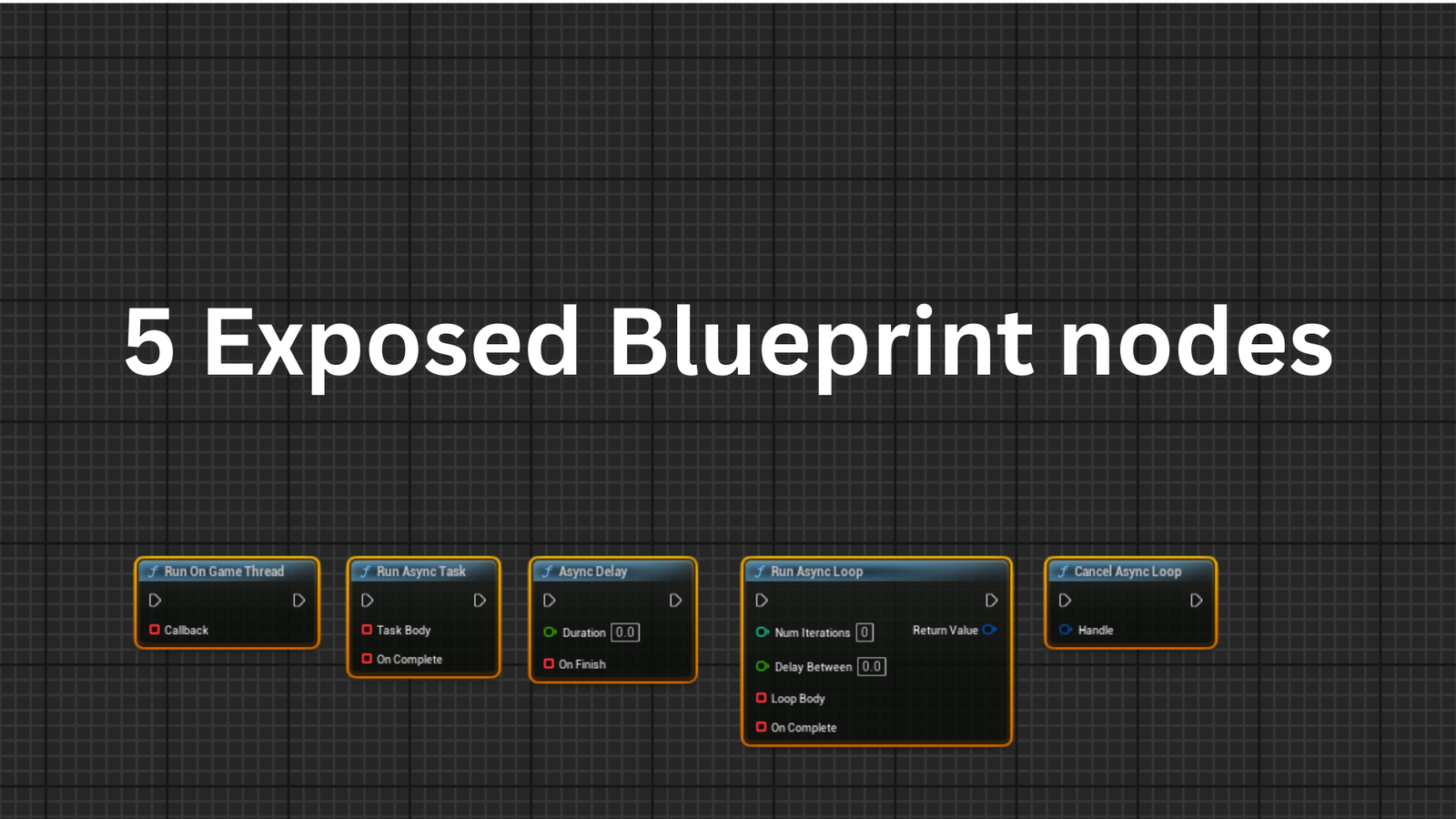
The plugin exposes a set of Blueprint nodes to help you manage threading and asynchronous operations.
Available Blueprint Nodes:
🔹 Run Async Task
Executes a section of Blueprint logic on a background thread, keeping your game thread responsive.
- ✅ Perfect for heavy calculations, data processing, or any logic that could cause frame hitches.
- ❌ Do not access UI elements or engine subsystems directly from the async task body.
🔹 Run On Game Thread
Returns execution from a background thread to the main game thread safely.
- ✅ Use to update UI, manipulate actors, or access main-thread-only engine features.
- ✅ Can pass data from the background thread back to the game thread.
🔹 Async Delay
Creates a non-blocking delay within asynchronous tasks.
- ✅ Executes on background threads without impacting the main game thread.
- ✅ Perfect for throttling operations or creating timed intervals in background tasks.
🔹 Run Async Loop
Creates a repeating background task with configurable intervals.
- ✅ Ideal for continuous processing tasks like AI thinking, background loading, or monitoring.
- ✅ Returns a loop ID that can be used to cancel the loop later.
🔹 Cancel Async Loop
Safely terminates a running async loop.
- ✅ Thread-safe cancellation of background loops using atomic booleans.
- ✅ Can be called from any thread.
Implementation Example:
1. Create a Blueprint with heavy processing that needs to run without blocking gameplay
2. Use "Run Async Task" to move the heavy calculation to a background thread
3. Perform your calculations on the background thread
4. Use "On Complete" callback to bring the results back to the main thread for UI updates
⚠️ Thread Safety Guide
CRITICAL: Understanding Thread Safety
Even though this plugin allows you to execute Blueprint logic on background threads, Unreal Engine's thread-safety rules still apply. You cannot bypass these fundamental limitations just because the operations are exposed to Blueprint.
Think of it like C++ async code — you wouldn't call GEngine->AddOnScreenDebugMessage()
from a worker thread in C++ either. The same rules apply here.
✅ SAFE in Task Body (Background Thread)
Pure operations that don't touch the game world:
- • Math operations: Add, Multiply, Divide, Power, etc.
- • Variable assignments: Setting integers, floats, booleans
- • Array/Map operations: Add, Remove, Find, Sort
- • Struct manipulation: Breaking and making structs
- • String operations: Append, Format, Length
- • Boolean logic: AND, OR, NOT operations
❌ UNSAFE in Task Body (Will Fail/Crash)
Anything that accesses UObjects or the game world:
- • Print String (accesses GEngine/viewport)
- • Get/Set Actor Location
- • Spawn Actor
- • Get Component
- • Any UObject function calls
- • Access World/GameMode/PlayerController
- • UI/UMG operations
📋 Examples: Wrong vs Right
WRONG - Print String in Task Body
                                        Run Async Task

                                          Task Body: Print String "Hello" ← Will fail intermittently

                                          On Complete: (empty)
Why it fails: Print String tries to access GEngine and the viewport, which are not thread-safe. This causes race conditions and intermittent failures.
RIGHT - Print String in On Complete
                                        Run Async Task

                                          Task Body: MyCounter = MyCounter + 1 ← Safe math operation

                                          On Complete: Print String "Task Done!" ← Runs on game thread
Why it works: Task Body only does pure math (thread-safe). Print String runs in On Complete which executes on the game thread where it's safe.
🎯 The Golden Rule
Task Body: Pure calculations, data processing, heavy math only
On Complete: Game world interactions, UI updates, Print String, Actor manipulation
🧪 Testing Your Async Tasks
If you're experiencing intermittent failures or tasks that "don't fire consistently," test with simple thread-safe operations first:
                                Run Async Task

                                  Task Body: bTaskCompleted = true (or increment a counter)

                                  On Complete: Print String "Counter value: {counter}"
This will prove your async task IS firing every time. If it works, then the issue was using thread-unsafe nodes in Task Body.
Technical Details
Threading
- Background logic executes in UE's thread pool
- Game-thread-safe callbacks using
AsyncTask - Cancelable loops use
FThreadSafeBoolfor atomic cancellation
Code Modules
AsyncBlueprintTools (Runtime)
Number of Blueprints
- 0 (All functionality is exposed through static Blueprint nodes)
C++ Classes
UAsyncBlueprintLibrary
Blueprint Function Library that exposes all core functionality to Blueprint users.
FAsyncTaskData
Internal shared object that maintains state between threads.
Network Replication
❌ No — all logic is local and runtime-threaded
Supported Development Platforms
- Windows ✅
- macOS ✅
- Linux ✅
Supported Target Build Platforms
- Win64 ✅
- macOS ✅
- Linux ✅
- Android ✅
- iOS ✅
Engine Compatibility
Compatible with Unreal Engine Versions:
Important: Consider using Cancel Async Loop when objects are destroyed to prevent hanging references.
Last Update: January 25, 2026
Distribution Method: Plugin
Need Help?
If you have any questions or need assistance with the plugin, feel free to reach out.
Contact Support